
Introduction
Have you faced these questions while setting up your VPCs and subnets in AWS?
- Which CIDR should I pick up for my VPC?
- How do I ensure the CIDR I pick is not in use or overlaps with another CIDR?
- What are all CIDRs in use in my various environment?
- What is the utilization of my CIDRs?
- How do I look at all the CIDR details in one place?
- How do I manage these CIDRs across accounts, regions, and AZs?
- How do I create network isolation for CIDRs if needed?
- How do I automate the provisioning of my CIDRs?
If yes, this article may be helpful.
In this article, I talk about how you can use the AWS IP Address Manager (IPAM) in a Control Tower environment to manage CIDRs across accounts, regions, and AZs centrally.
Challenges of managing IPs manually
Back in the time when most of the workloads ran in data centers, applications teams usually never had to worry about CIDRs and IPs, and it was usually managed centrally by the networking team. With the advent of cloud-native solutions, developers are increasingly exposed to the responsibilities of managing IPs and CIDRs. While industry solutions like the following
- SolarWinds IP Address Manager
- ManageEngine OpUtils
- BlueCat IPAM
- Infoblox IPAM
- LightMesh IPAM
- Device42
are available to manage IPs centrally, CIDRs are still widely managed using rudimentary tools like an Excel sheet. Typically in this Excel sheet, you will list down all your stack components or departments that need dedicated VPCs and allocate CIDRs to them. You will allocate CIDRs for the different Regions and AZs. You also list down all your subnet CIDRs and their respective allocations as well. I have seen Excel work fine in small to medium setups, though it has challenges like the following.
- It is a manual process and prone to human error.
- It’s difficult to have compliance if infrastructure provisioning and development are not centrally managed.
- CIDR overlap and reuse can cause network errors which can be cumbersome to troubleshoot and fix.
- CIDRs can be grossly under-utilized or over-utilized in case of improper planning.
- Tracking CIDR allocation history is very difficult, if not impossible.
- What you have in your Excel might not be the exact and most recently updated view.
What is AWS IPAM
AWS IPAM was released around 1.5 years back and is part of AWS VPC features. Simply put, AWS IPAM is a feature to manage your IPs. It provides the following features.
- IP Planning & Automated Allocation of IP Addresses
- IP Address Usage Tracking & Monitoring
- IP Network Observability
- IP Address Auditing
- Network Troubleshooting
AWS IPAM Concepts
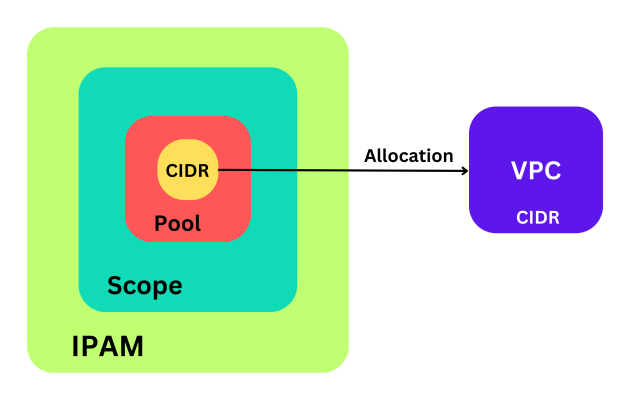
There are three main concepts to understand in AWS IPAM.
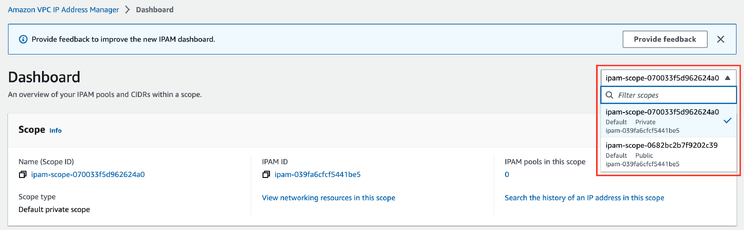
Scope: Scope is like a namespace. It is the highest-level container within the IPAM. When you create an IPAM by default, two scopes get created. A private and a public scope to manage private and public IP, respectively. Within a scope, you create pools.
Pool: A pool is a collection of CIDRs. A pool allows you to segregate your CIDRs according to your networking requirements. You can create a hierarchy of pools that accurately reflects your network structure.
Allocation: Once you have defined your scope and the pools within a scope, you assign CIDRs from a pool to a resource like VPC.
Control Tower
We will be using a Control Tower setup to test the IPAM over multiple accounts. Control Tower is an AWS service that provides a landing zone based on best practices for setting up an account organization in AWS. It, by default, creates a couple of accounts for the management of security and logging functions of the Landing Zone and provides a way to easily create workload accounts with all the necessary security, logging, and networking baselines.
This is what our AWS Organization looks like for this setup.
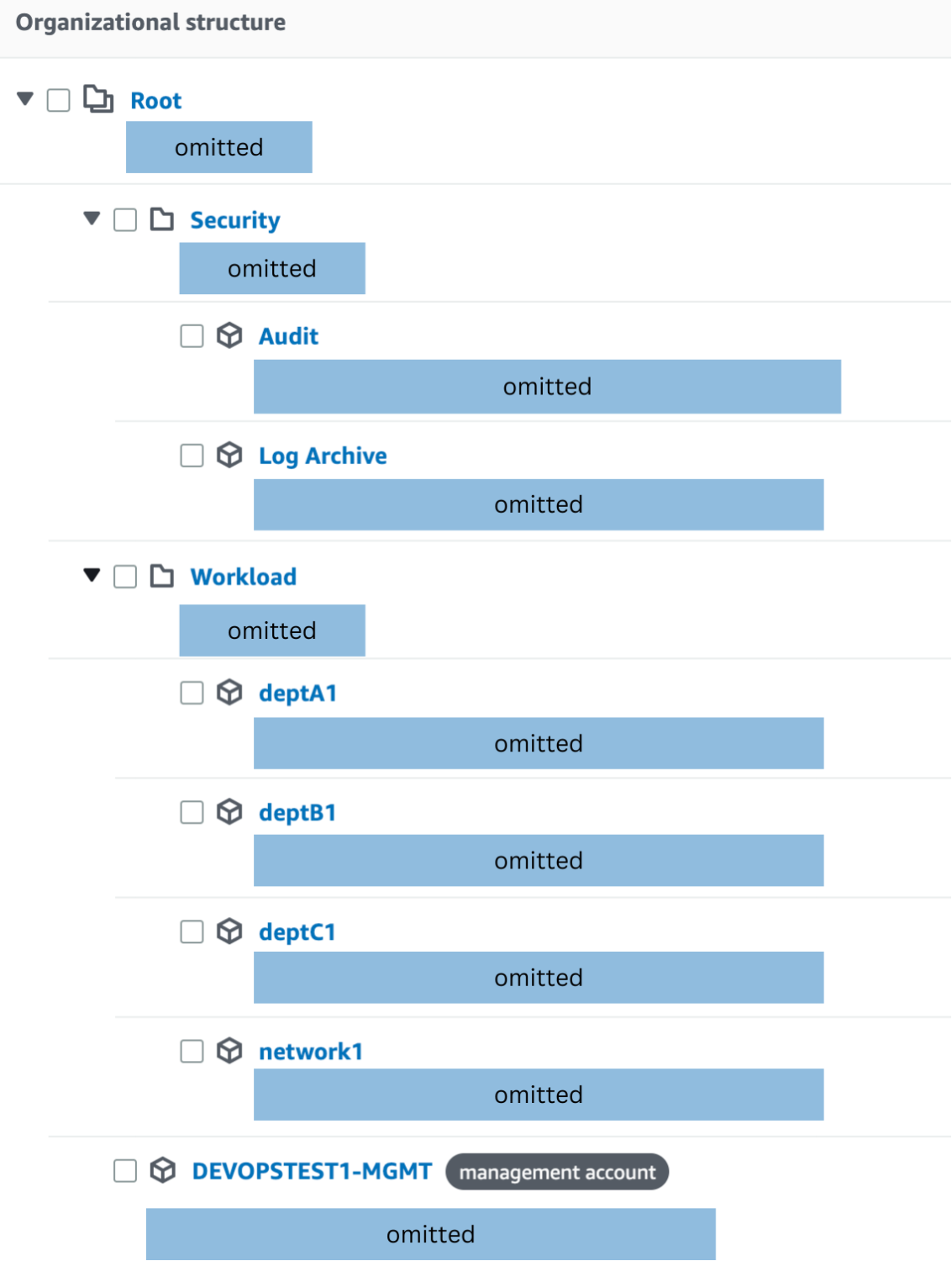
- The Security OU and its accounts get created as part of the Control Tower setup.
- The Accounts in the Workload OU are created using the Account Factory provided by Control Tower.
- The network1 account is the account for all networking services and will be used to administer the IPAM service.
- The three department accounts simulate different departments/verticals/stacks in an organization.
Network Design
Before we set up the IPAM, let’s design the network and decide on the CIDRs for our various departments.
Before we design, please note that this is NOT THE ONLY WAY to do it, and the network design can be unique to your setup. This is just one of the ways to do it, which we will use for this demo.
Let us assume
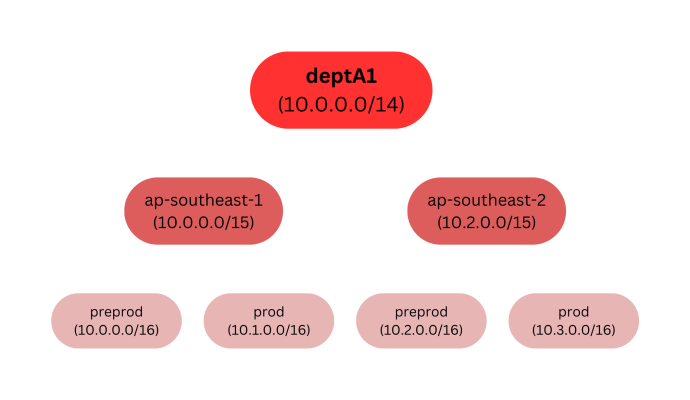
- We have three departments deptA1, deptB1, and deptC1
- A presence in 2 regions, namely ap-southeast-1 and ap-southeast-2
- Each region has two environments, pre-prod and prod.
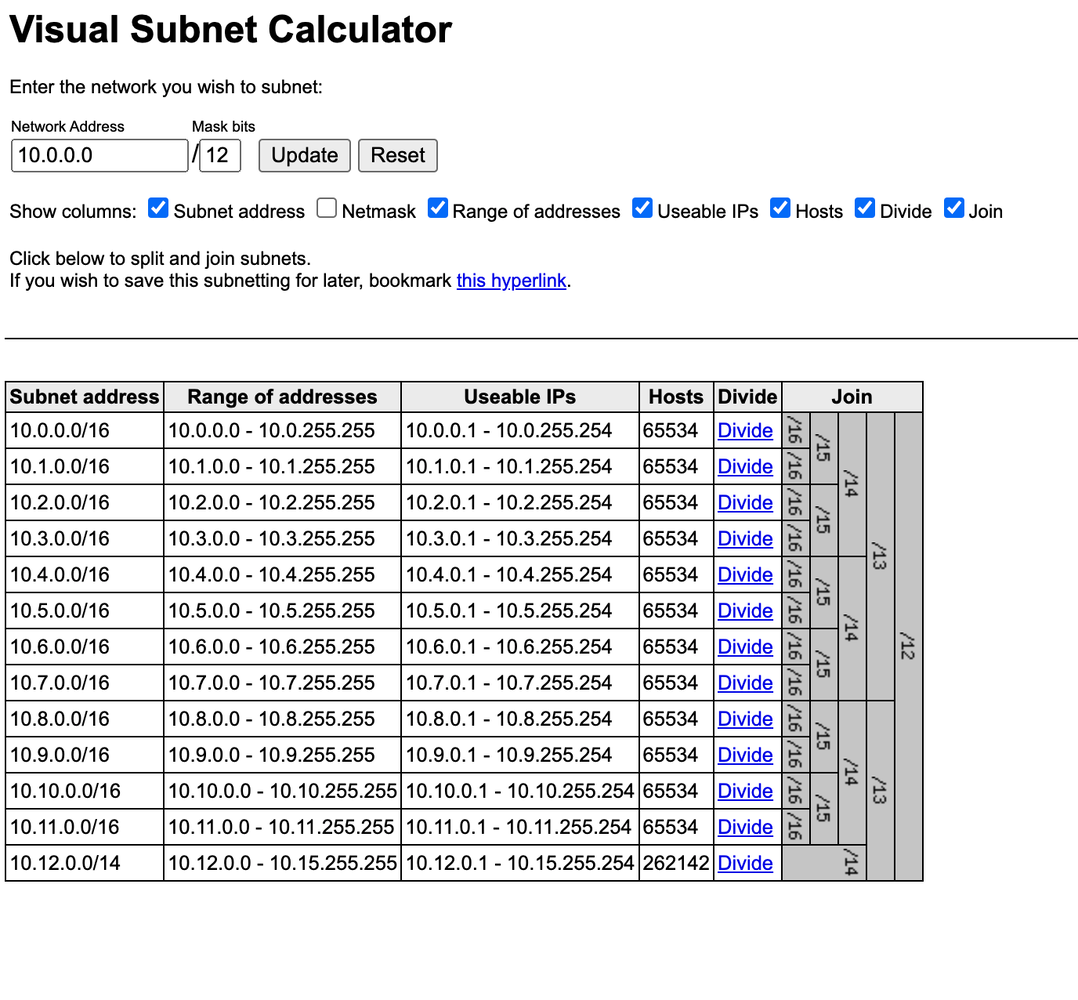
Using one of my favorite tools to design CIDRs, we arrive at a list of CIDRs for our requirements. Here is how the list looks like.
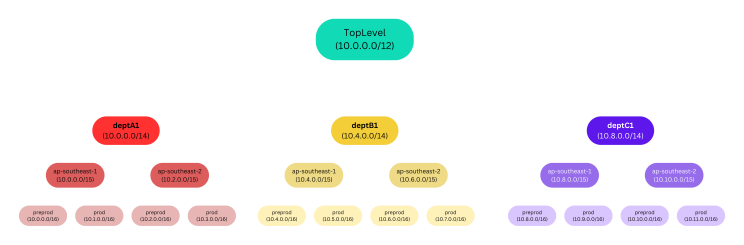
This is a hierarchical representation of the above table.
Steps for creating and using IPAM
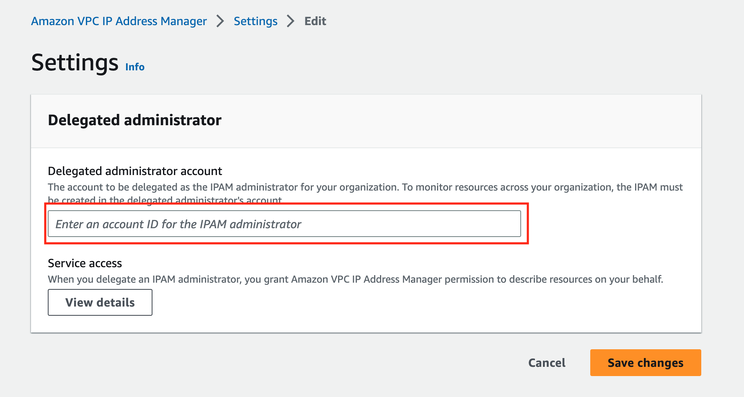
1. Setup a delegated admin for the IPAM service
- Log in to the Management Account from the AWS SSO page
- Open the IPAM setting page
- Setup the network account as the Delegated Administrator for the IPAM by putting the account ID of the network account in the given field
2. Create an IPAM instance
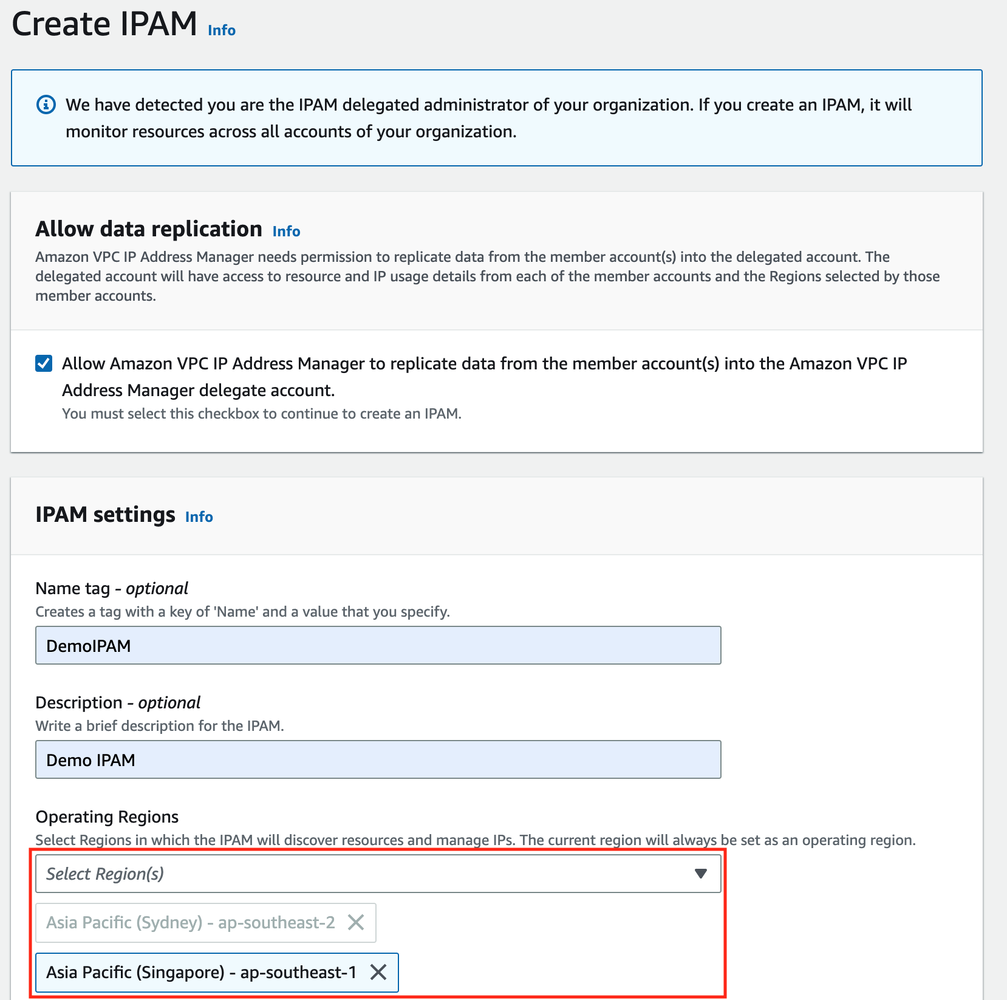
- Now log in to the Networking Account from the AWS SSO page
- Open the IPAM homepage and create an IPAM instance
- Select the regions where you want to discover resources and manage IPs. For our demo, we will select ap-southeast-1 apart from the default region ap-southeast-2, where the IPAM is provisioned.
Once the IPAM pool is created will notice that a private and public scope gets created by default.
3. Create the scope and pools
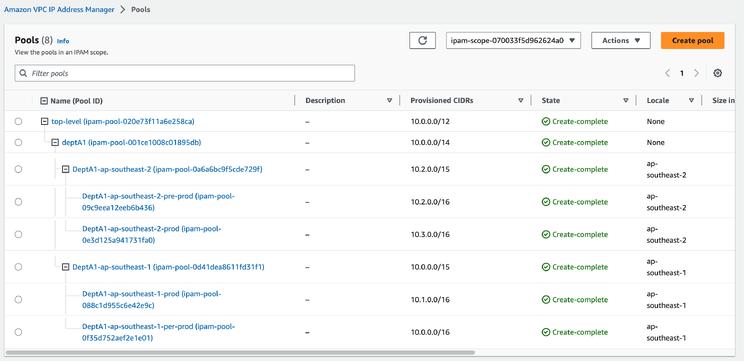
Once you have set up the IPAM and any required scope, we now create all the CIDR pools based on the network diagram above.
This is how the CIDR hierarchy of deptA1 looks in the network diagram and the IPAM pools, respectively.
4. Share the IPAM across the organization
Once you have created the pools, you need to share these with the individual accounts so that they can be used to create VPCs.
To do this
- Ensure that you are logged in to the network1 account.
- Go to the Resource Access Manager service.
- Create a new resource share.
- Select the IPAM pool you want to share
- Share the pool with the department-specific account
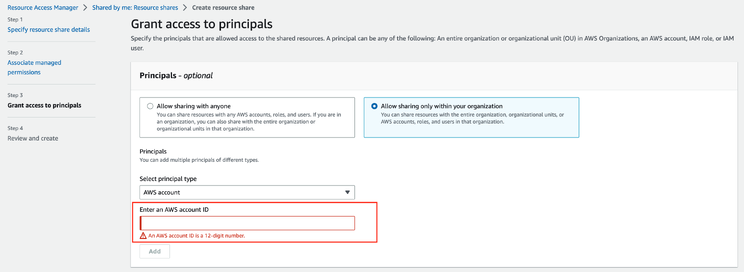
After this step, your pools are now ready to use for allocation.
5. Allocate a CIDR from a defined pool
- Login to the DeptA1 account
- Create a VPC, and instead of giving a CIDR explicitly, choose to use an IPAM pool instead.
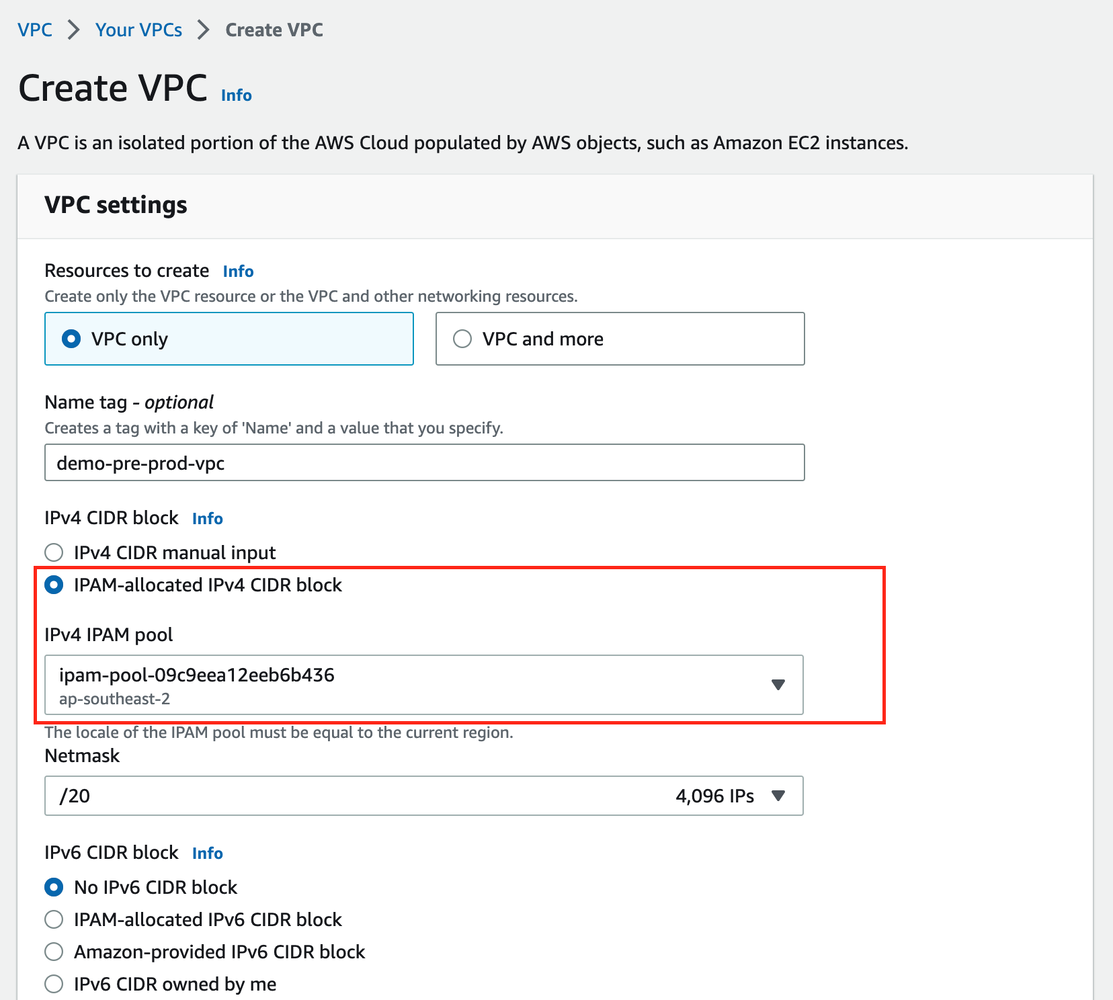
And that is it! This is how you can use the IPAM pools to manage your CIDRs across your AWS account in a Control Tower setup.
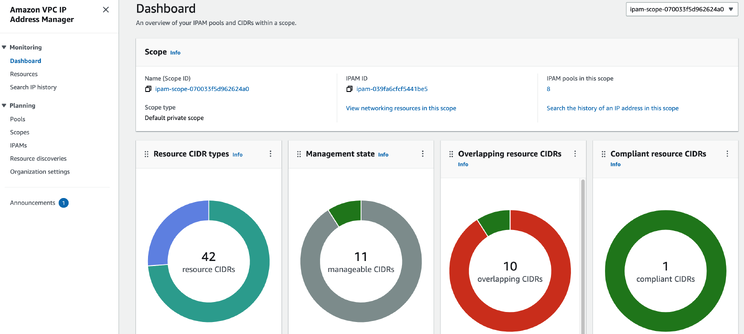
6. Manage and monitor your pools
The IPAM dashboard and the console provide several tools to monitor, manage, audit, and troubleshoot your IP pools.
Using IaC (Terraform) for provisioning and managing IPAM
All the above steps can be done using IaC as well. If you are using Terraform, you might use multiple providers. One for the networking account to set up your pools and scope as per your network design using the following resources
- aws_vpc_ipam Provides an IPAM resource.
- aws_vpc_ipam_scope Creates a scope for AWS IPAM.
- aws_vpc_ipam_pool Provides an IP address pool resource for IPAM.
- aws_vpc_ipam_pool_cidr Provisions a CIDR from an IPAM address pool.
- aws_vpc_ipam_pool_cidr_allocation Allocates (reserves) a CIDR from an IPAM address pool, preventing usage by IPAM. Only works for private IPv4.
Once the IPAM pools are set up, you might share the pools using the following resource
Once the IPAM pools are shared, you might use a provider for your workload account to provision VPCs using something like
resource "aws_vpc" "test" {
  ipv4_ipam_pool_id   = aws_vpc_ipam_pool.test.id
  ipv4_netmask_length = 28
}
Cost of IPAM
You are charged hourly for each active IP address that IPAM monitors.
An active IP address is defined as an IP address assigned to a resource such as an EC2 instance or an Elastic Network Interface (ENI).
Hourly Price per active IP address managed by IPAM costs $0.00027 USD
Check this link for some examples of IPAM pricing.
Final thoughts
Managing network CIDRs centrally can be an involved affair. Automating it, while is a bit of an effort, can prove to be a great asset in the long run. It would be interesting to see if there would be tighter integration of this feature with AWS Control Tower in the future.